
Microsoft has expanded its compact Surface lineup with two new Snapdragon-powered Windows PCs: the Surface Laptop 13-inch (2nd Edition) and Surface Pro 12-inch (2nd Edition). Announced in September 2026, both devices are built around Qualcomm’s Snapdragon X2 Plus platform and are designed to deliver lightweight Windows 11 computing with Copilot+ PC capabilities.
The two products may look like close alternatives, but they are designed for different types of users. The Surface Laptop 13 is a traditional notebook with an integrated keyboard, while the Surface Pro 12 is a detachable 2-in-1 that can switch between tablet and laptop modes.
There is also an important processor detail to clear up before comparing them. The 13-inch Surface Laptop and 12-inch Surface Pro both use the 6-core Snapdragon X2 Plus configuration. The 10-core Snapdragon X2 Plus is available on larger Surface models, including the 13.8-inch Surface Laptop and 13-inch Surface Pro.
Microsoft announced the new compact Surface models on September 24, 2026, with availability beginning October 13, 2026 in markets where Microsoft has announced availability.
So, rather than treating this as a simple processor battle, the more useful comparison is about battery life, display, portability, keyboard design, ports, cameras, AI features, storage and the way each device fits into everyday work.
Surface Laptop 13 vs Surface Pro 12 Quick Comparison
| Specification | Surface Laptop 13 (2nd Edition) | Surface Pro 12 (2nd Edition) |
|---|---|---|
| Processor | Snapdragon X2 Plus, 6-core | Snapdragon X2 Plus, 6-core |
| GPU | Qualcomm Adreno | Qualcomm Adreno |
| NPU | Qualcomm Hexagon, up to 80 TOPS | Qualcomm Hexagon, up to 80 TOPS |
| Display | 13-inch PixelSense LCD | 12-inch PixelSense LCD |
| Resolution | 1920 × 1280 | 2196 × 1464 |
| Refresh rate | Up to 60Hz | Up to 90Hz |
| Touch | Yes | Yes |
| Aspect ratio | 3:2 | 3:2 |
| RAM | 16GB / 24GB LPDDR5x | 16GB / 24GB LPDDR5x |
| Storage | 256GB / 512GB UFS | 256GB / 512GB UFS |
| Claimed video playback | Up to 22.5 hours | Up to 15.5 hours |
| Claimed active web use | Up to 18 hours | Up to 13 hours |
| Weight | 2.7 lb / 1.23kg | 1.5 lb / 686g |
| USB-C | 2 | 2 |
| USB-A | Yes | No |
| Headphone jack | 3.5mm | Not listed |
| Wi-Fi | Wi-Fi 7 | Wi-Fi 7 |
| Front camera | 1080p Full HD | 1080p Full HD |
| Rear camera | No | 10MP |
| Keyboard | Built in | Optional detachable keyboard |
| Form factor | Laptop | 2-in-1 tablet/laptop |
| Starting US price | $1,199.99 | $1,149.99 |
Microsoft’s current US Store lists the Surface Laptop 13-inch (2nd Edition) from $1,199.99 and the Surface Pro 12-inch (2nd Edition) from $1,149.99.
📌 Read more:
- Microsoft Surface Laptop 13 vs Surface Pro 12 Snapdragon X2 Plus, Battery, Display and Price
- ASUS Vivobook S16 Price, Specifications, Features & Is It Worth Buying 2026?
- Best AI Laptops in 2026: Which One Should You Buy?
- MacBook Neo Review 2026, A18 Pro, 8GB RAM, 256GB SSD: Is Apple’s Cheapest MacBook Worth Buying?
- Best Gaming Laptops 2026: Top Picks for Every Budget
- Best Laptop Under ₹50000 in India 2026 | Top 10 Latest Picks
Surface Laptop 13 vs Surface Pro 12: Price and Availability
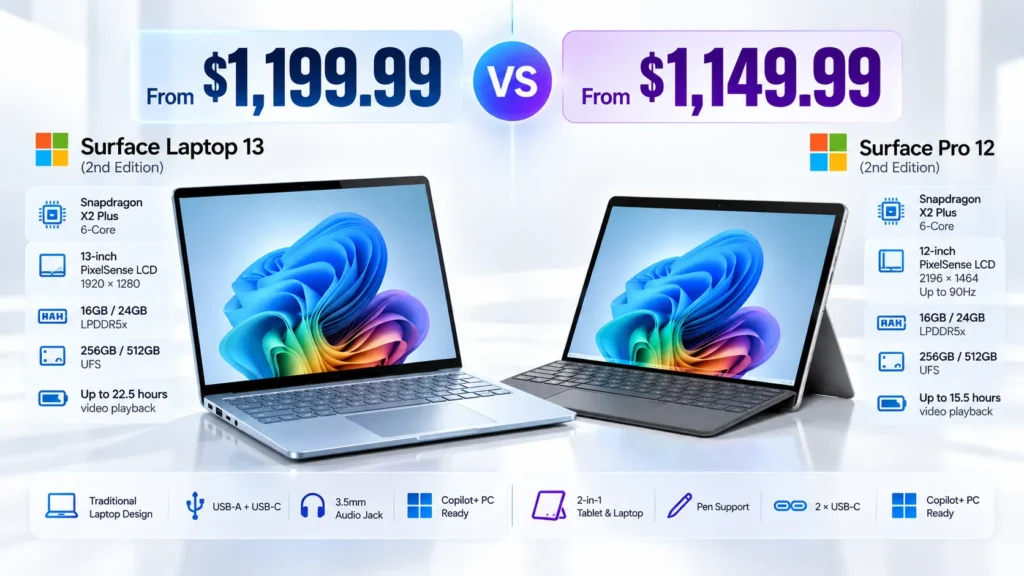
The Surface Pro 12 starts slightly below the Surface Laptop 13 in the US.
Surface Laptop 13 Price
Microsoft lists the Surface Laptop 13-inch (2nd Edition) at a starting price of $1,199.99 in the US. The base configuration includes:
- Snapdragon X2 Plus 6-core
- 16GB LPDDR5x RAM
- 256GB UFS storage
Microsoft also lists 16GB/512GB configurations at $1,299.99 and 24GB/512GB configurations at $1,499.99.
Surface Pro 12 Price
The Surface Pro 12-inch (2nd Edition) starts at $1,149.99 in Microsoft’s US Store. The base model includes:
- Snapdragon X2 Plus 6-core
- 16GB RAM
- 256GB UFS storage
Microsoft lists 16GB/512GB at $1,249.99 and 24GB/512GB at $1,449.99.
The important catch is that the Surface Pro is not a complete traditional laptop at its base price. Microsoft sells the Surface Pro 12-inch Keyboard separately, currently listed at $149.99 on the US Store.
Therefore, buyers comparing the two as laptop replacements should consider the accessory cost rather than looking only at the starting device prices.
For Indian buyers, US pricing should not be converted directly into rupees and presented as official India pricing. Regional taxes, currency rates and availability can change the final price.
Read: Samsung Galaxy F17 5G Review (2026), Best Phone Under ₹17000
Snapdragon X2 Plus: Same Processor Class, Different Devices
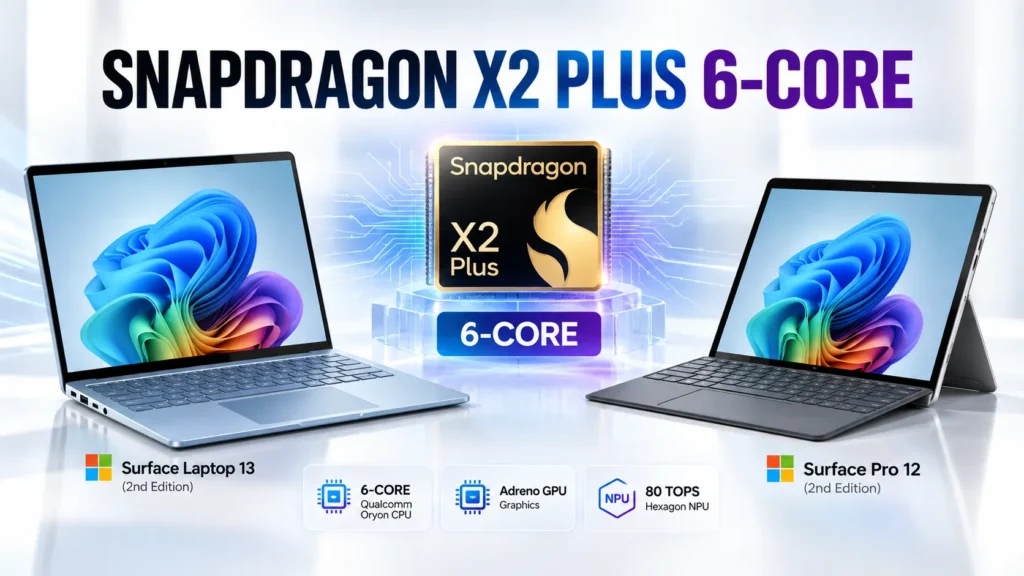
The processor is one of the biggest points of confusion surrounding these new Surface models.
The Surface Laptop 13-inch (2nd Edition) uses a Snapdragon X2 Plus with six CPU cores. Microsoft also lists a Qualcomm Hexagon NPU capable of up to 80 TOPS and Qualcomm Adreno graphics.
The Surface Pro 12-inch (2nd Edition) also uses the six-core Snapdragon X2 Plus, along with Qualcomm Adreno graphics and an NPU rated at up to 80 TOPS.
This means there is no six-core-versus-10-core CPU difference between these two particular devices.
The 10-core Snapdragon X2 Plus appears in Microsoft’s larger Surface configurations. Microsoft’s current Surface Laptop comparison lists the 13.8-inch model with a 10-core X2 Plus option, while the 13-inch model uses the 6-core version.
For buyers, this distinction is important because the name Surface Laptop 13 can easily be confused with the larger 13.8-inch Surface Laptop.
Read: Best Camera Phones Under ₹30K in 2026: Real Camera
Performance: What Can You Expect?
Both machines are built around the same six-core Snapdragon X2 Plus platform, so the choice is less about buying one specifically for a higher CPU core count.
For everyday tasks, both are designed for Windows 11 workloads such as:
- Web browsing
- Microsoft Office
- Video conferencing
- Document editing
- Streaming
- Cloud applications
- Everyday multitasking
Microsoft says the new Surface Laptop 13 and Surface Pro 12 deliver performance improvements over their respective previous-generation models, including gains in Office productivity, graphics and local AI inference. Microsoft’s measurements were conducted using specific benchmark configurations, so they should not be interpreted as universal performance results for every workload.
For heavier work such as coding, large spreadsheets, photo editing or video production, application optimization for Windows on Arm can have an important effect on the experience.
AI and Copilot+ PC Features
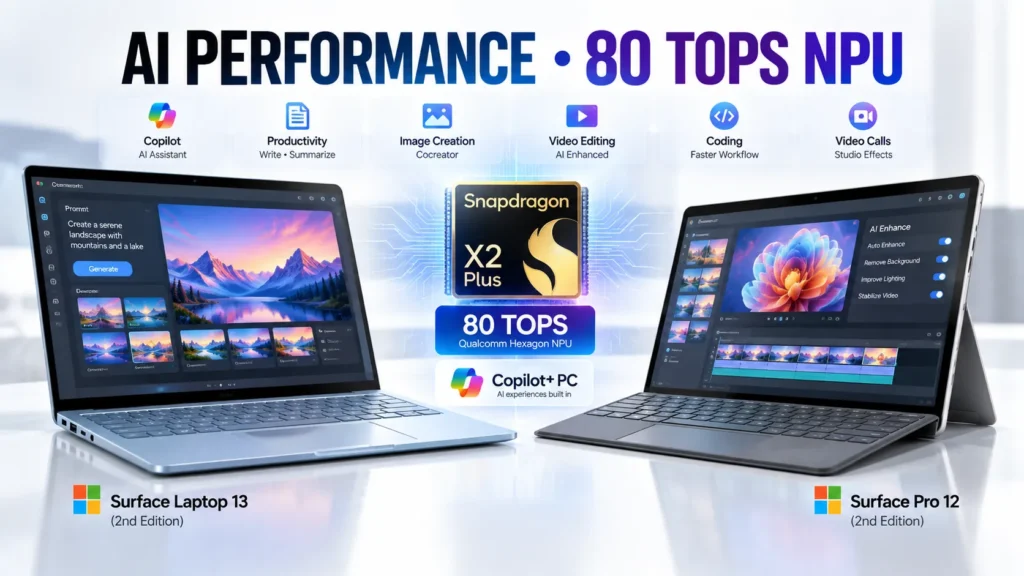
The Snapdragon X2 Plus platform is also designed around local AI processing. Both Surface models include a Qualcomm Hexagon NPU rated at up to 80 TOPS, providing dedicated hardware for supported AI workloads.
That makes both devices part of Microsoft’s Copilot+ PC ecosystem. Supported Windows AI experiences can include features such as:
- Windows Studio Effects
- Live Captions
- Cocreator
- AI-assisted camera effects
- Supported local AI experiences
- Copilot+ Windows features
Microsoft’s September announcement also highlights improvements in local AI inference compared with the previous generation.
However, Copilot+ should not be interpreted as meaning every AI feature is completely offline. Availability can depend on Windows updates, applications, language support and Microsoft’s current feature set.
The Surface Pro also has a particularly tablet-focused AI and pen workflow, while the Surface Laptop is oriented more toward conventional keyboard-and-trackpad productivity.
Battery Life: Surface Laptop 13 vs Surface Pro 12
Battery life is one area where Microsoft’s published figures show a noticeable difference.
Surface Laptop 13 Battery Life
Microsoft rates the Surface Laptop 13 for:
- Up to 22.5 hours of local video playback
- Up to 18 hours of active web usage.
Microsoft says its video test was performed in August 2026 using a preproduction Surface Laptop 13 with 16GB RAM and 256GB storage. The test used 1080p video playback at 24fps, with brightness set to 150 nits and Wi-Fi connected.
Surface Pro 12 Battery Life
Microsoft rates the Surface Pro 12 for: Up to 15.5 hours of battery life.
The figure should be treated as a manufacturer test result rather than a guarantee of everyday usage. Real battery life can change with:
- Screen brightness
- Browser tabs
- Video calls
- Wi-Fi activity
- AI workloads
- Background applications
- External displays
- Performance settings
- Application optimization
Therefore, users should not expect 22.5 or 15.5 hours in every real-world situation.
📌 Read more:
- Apple Event iPhone 18 Pro and iPhone 18 Pro Max, iPhone Duo & Apple Watch Series 12, Apple Watch Ultra 4 and AirPods 5.
- Apple iPhone 17 Series Features & Price in India 2025-26
- Best Camera Phones 2026: Top 5 Phones for Photography and Video
- Best Camera Phones Under ₹30K in 2026: Real Camera Comparison
- Best Phone Under ₹15000 in India (2026) – Top 10 Budget Picks
- Best Phones for BGMI & Free Fire in 2026: Smooth FPS, Zero Lag & Best Gaming Experience
Display Comparison
| Display Feature | Surface Laptop 13 | Surface Pro 12 |
|---|---|---|
| Size | 13 inches | 12 inches |
| Panel | PixelSense LCD | PixelSense LCD |
| Resolution | 1920 × 1280 | 2196 × 1464 |
| Aspect ratio | 3:2 | 3:2 |
| Refresh rate | Up to 60Hz | Up to 90Hz |
| Touch | Yes | Yes |
| Brightness | Up to 500 nits | Up to 500 nits |
| Pen support | No | Yes |
The Surface Laptop 13 has the larger physical display at 13 inches, with a 1920 × 1280 resolution and 60Hz refresh rate. Microsoft lists the display as a PixelSense touchscreen.
The Surface Pro 12 has a smaller 12-inch display but a higher 2196 × 1464 resolution and support for up to 90Hz. The difference becomes more practical when considering how the screens are used. The Laptop is designed primarily for:
- Documents
- Spreadsheets
- Browsing
- Traditional productivity
- Keyboard-based work
The Pro adds:
- Touch-first interaction
- Tablet use
- Pen input
- Drawing
- Handwritten notes
- More flexible viewing positions
So the display choice is not simply about resolution or refresh rate.
📌 Read more:
- Xiaomi Watch S5 46mm vs Redmi Watch 6 NFC vs Redmi Watch 6
- Sony ULT Field 5 Review: The Best Portable Party Speaker Yet
- Samsung Galaxy Tab S11 Ultra Review: Best Samsung Tablet 2025
- OnePlus Nord Buds 4 Launched in India: Price, ANC, Battery Life & Features
- NVIDIA RTX Spark AI PC: Performance, Features, Price & Launch
- Nothing Ear 3 Review, Price in India, Specs, ANC & Battery
Design and Portability
The Surface Laptop 13 weighs approximately 2.7 pounds or 1.23kg. It uses a traditional laptop design with an integrated keyboard and trackpad.
The Surface Pro 12 tablet weighs approximately 686g or 1.5 pounds before adding the optional keyboard.
That makes the Pro particularly interesting for users who want a lightweight tablet.
However, buyers should remember that the Surface Pro’s optional keyboard adds weight. A fair travel comparison should therefore consider the complete Surface Pro setup rather than comparing the bare tablet with a complete laptop.
The Surface Laptop, meanwhile, is always ready to type because the keyboard is permanently attached.
Read: Xiaomi Watch S5 46mm vs Redmi Watch 6 NFC vs Redmi Watch 6
Keyboard and Touchpad
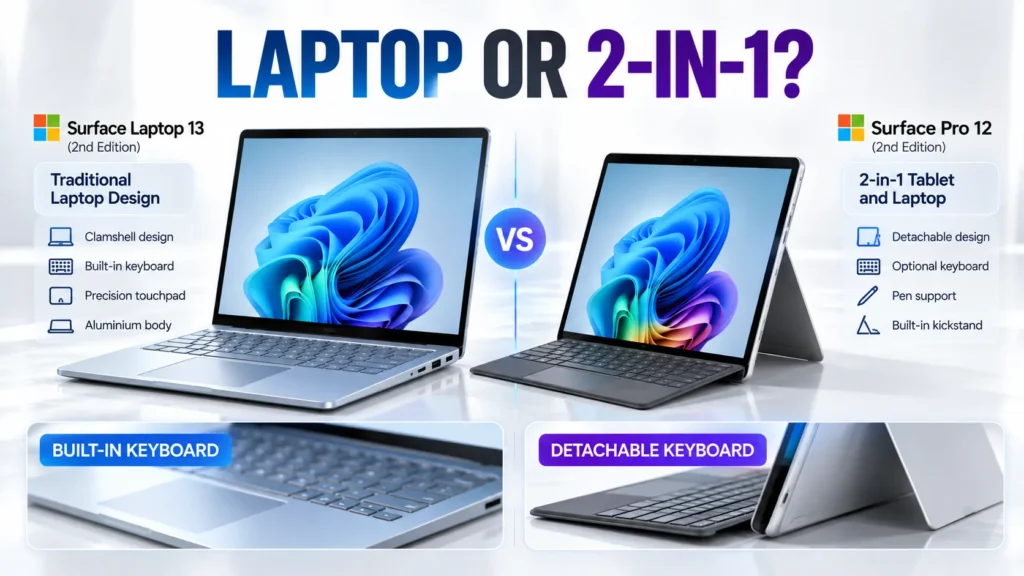
This is arguably one of the biggest practical differences. The Surface Laptop 13 has a built-in keyboard and precision touchpad. It works as a traditional laptop straight out of the box.
The Surface Pro 12 has a detachable keyboard. Microsoft positions the device as a tablet, sketchbook and laptop, with the keyboard allowing it to switch into a more conventional laptop configuration.
This makes the Pro more flexible, but it also means buyers who want a complete laptop-style setup need to budget for the keyboard.
The Surface Pro also supports the Surface Slim Pen, with magnetic storage and wireless charging on the rear of the device.
Ports and Connectivity
| Connectivity | Surface Laptop 13 | Surface Pro 12 |
|---|---|---|
| USB-C | 2 × USB-C / USB 3.2 | 2 × USB-C / USB 3.2 |
| USB-A | Yes | No |
| 3.5mm headphone jack | Yes | Not listed |
| Wi-Fi | Wi-Fi 7 | Wi-Fi 7 |
- The Surface Laptop 13 has two USB-C/USB 3.2 ports, a USB-A 3.2 port and a 3.5mm headphone jack.
- The Surface Pro 12 has two USB-C/USB 3.2 ports and no USB-A port listed in Microsoft’s specifications.
- For users with older USB accessories, the Laptop’s USB-A port can reduce the need for an adapter.
- The Surface Pro takes a more minimal approach and may require a USB-C hub for users connecting multiple traditional peripherals.
- Both devices support Wi-Fi 7.
Cameras and Video Calls
The Surface Laptop 13 includes a 1080p Full HD front camera for video calls.
The Surface Pro 12 goes further with both a front and rear camera. Microsoft’s specifications list a 1080p front camera and a 10MP rear camera.
The rear camera makes more sense on the Pro because the device can be held like a tablet.
For example, a user can detach the keyboard, hold the Surface Pro in portrait or landscape orientation and use the rear camera to photograph documents, whiteboards or other objects.
That is less practical with a conventional clamshell laptop.
Read: Best AI Laptops in 2026: Which One Should You Buy?
RAM and Storage
Both devices are available with:
- 16GB LPDDR5x RAM
- 24GB LPDDR5x RAM
- 256GB UFS storage
- 512GB UFS storage
Microsoft lists the Surface Laptop 13’s configurations from 16GB/256GB through 24GB/512GB.
The Surface Pro 12 offers the same broad RAM and storage levels, with its entry model using 16GB RAM and 256GB UFS storage.
For buyers planning to use many applications simultaneously, the 24GB configuration may be worth considering. Storage should also be selected carefully because moving to the 512GB version later is not the same as simply adding an external drive.
Windows on Arm and Application Compatibility
Both Surface models use Snapdragon hardware and run Windows 11 on Arm. That brings an important consideration for professional users: application and driver compatibility.
Many mainstream Windows applications now have native Arm versions, while Windows can also run compatible x86 and x64 applications through emulation.
Microsoft’s Windows-on-Arm documentation explains that native Arm applications can provide advantages in performance, responsiveness and efficiency, while compatibility for older applications depends on Microsoft’s emulation layer and the application’s requirements.
Specialized software and hardware drivers should therefore be checked before buying. This is particularly relevant for:
- Professional engineering software
- Older business applications
- Specialized creative software
- Hardware utilities
- Older peripherals
- Industry-specific applications
For general Microsoft 365, web browsing, communication and everyday Windows tasks, the Snapdragon platform is aimed squarely at this type of lightweight PC experience.
Read: Best Gaming Laptops 2026: Top Picks for Every Budget
Surface Laptop 13 vs Surface Pro 12 Key Differences
| Category | Surface Laptop 13 | Surface Pro 12 |
|---|---|---|
| Form factor | Traditional laptop | Detachable 2-in-1 |
| Processor | 6-core X2 Plus | 6-core X2 Plus |
| Display size | 13 inches | 12 inches |
| Display resolution | 1920 × 1280 | 2196 × 1464 |
| Refresh rate | Up to 60Hz | Up to 90Hz |
| Keyboard | Built in | Optional |
| Pen support | No | Yes |
| USB-A | Yes | No |
| Rear camera | No | 10MP |
| Tablet use | Limited | Designed for it |
| Weight | 1.23kg | 686g tablet |
| Claimed video playback | Up to 22.5 hours | Up to 15.5 hours |
| Starting US price | $1,199.99 | $1,149.99 |
Which Surface Should You Choose?
Choose Surface Laptop 13 if:
- You want a conventional laptop.
- You type frequently.
- You want a built-in keyboard.
- You need USB-A connectivity.
- You prefer a slightly larger display.
- You want Microsoft’s higher published battery-life figure.
- You do not need pen input.
The Surface Laptop 13 is built around the traditional notebook experience, with its keyboard, trackpad and display permanently connected.
Choose Surface Pro 12 if:
- You want a tablet and laptop in one.
- Touch is an important part of your workflow.
- You want to use a Surface Slim Pen.
- You want a very lightweight tablet.
- You prefer a display capable of up to 90Hz.
- You want a rear camera.
- You are comfortable buying a detachable keyboard separately.
The Surface Pro 12 is particularly suited to people who want their Windows PC to change shape depending on the task.
Pros and Cons
Surface Laptop 13
Pros
- Snapdragon X2 Plus 6-core
- 13-inch 3:2 touchscreen
- Integrated keyboard
- USB-A plus USB-C
- Wi-Fi 7
- Up to 22.5 hours claimed video playback
- 80 TOPS NPU
- Copilot+ PC capabilities
- 2.7-pound design
Cons
- 60Hz display
- No pen support
- Less flexible than a detachable tablet
- UFS storage
- ARM compatibility should be checked for specialist software
Surface Pro 12
Pros
- Snapdragon X2 Plus 6-core
- 80 TOPS NPU
- 12-inch 3:2 touchscreen
- Up to 90Hz refresh rate
- 686g tablet body
- Detachable keyboard design
- Pen support
- 10MP rear camera
- Wi-Fi 7
- Copilot+ PC features
Cons
- Keyboard is an additional purchase
- No USB-A
- Only two USB-C ports
- UFS storage
- Microsoft’s claimed battery figure is lower than the Laptop 13’s
- Real-world battery life varies by workload
Read: Best Laptop Under ₹50000 in India 2026 | Top 10 Latest Picks
Final Verdict
The Surface Laptop 13 and Surface Pro 12 are two different interpretations of a compact Windows PC.
The Surface Laptop 13 focuses on the traditional notebook experience. Its integrated keyboard, 13-inch screen, USB-A port and higher published battery-life figures make it a straightforward option for people whose work mainly involves typing, browsing, documents, spreadsheets and conventional Windows applications.
The Surface Pro 12 takes a more flexible route. Its 686g tablet body, detachable keyboard, pen support, rear camera and 90Hz-capable display make it a more adaptable device for users who want to move between laptop, tablet and pen-based workflows.
Interestingly, the processor does not create a major divide between these two models. Both use the 6-core Snapdragon X2 Plus with an 80 TOPS Qualcomm Hexagon NPU.
That makes the purchasing decision less about choosing between different CPU core counts and more about choosing the form factor that matches your daily work.
There is also one specification detail buyers should remember: the 10-core Snapdragon X2 Plus is found in larger Surface models, including the 13.8-inch Surface Laptop and 13-inch Surface Pro. It is not the processor configuration used by the 13-inch Surface Laptop 2nd Edition or 12-inch Surface Pro 2nd Edition.
For anyone considering either device, Microsoft’s published specifications provide a useful starting point, but battery performance, application compatibility and accessory requirements should be considered alongside the headline specifications.
Frequently Asked Questions
Q1. What is the difference between Surface Laptop 13 vs Surface Pro 12?
A1. The Surface Laptop 13 is a conventional clamshell laptop with an integrated keyboard. The Surface Pro 12 is a detachable 2-in-1 that can work as a tablet or laptop with its optional keyboard.
Q2. Does Surface Laptop 13 use Snapdragon X2 Plus?
A2. Yes. The 13-inch Surface Laptop 2nd Edition uses the 6-core Snapdragon X2 Plus with a Qualcomm Hexagon NPU rated at up to 80 TOPS.
Q3. Does Surface Pro 12 use Snapdragon X2 Plus?
A4. Yes. The Surface Pro 12-inch 2nd Edition also uses the 6-core Snapdragon X2 Plus and an 80 TOPS Qualcomm Hexagon NPU.
Q4. Which has better battery life?
A4. Based on Microsoft’s published testing, the Surface Laptop 13 has the higher claim, at up to 22.5 hours of local video playback and 18 hours of active web use. The Surface Pro 12 is rated for up to 15.5 hours.
Q5. Which has the better display?
A5. They prioritize different features. The Surface Laptop 13 has a larger 13-inch 1920 × 1280 60Hz display, while the Surface Pro 12 has a 2196 × 1464 display capable of up to 90Hz.
Q6. Is Surface Pro 12 a laptop or tablet?
A6. It is a 2-in-1 Windows PC. It can be used as a tablet and can become a laptop-style device when paired with Microsoft’s detachable keyboard.
Q7. Is the Surface Pro keyboard included?
A7. No. Microsoft’s US Store lists the Surface Pro 12-inch keyboard as a separate accessory.
Q8. How much does Surface Pro 12 cost?
A8. Microsoft’s current US Store lists the Surface Pro 12-inch 2nd Edition from $1,149.99.
Q9. Does Surface Laptop 13 have USB-A?
A9. Yes. Microsoft lists one USB-A 3.2 port alongside two USB-C/USB 3.2 ports and a 3.5mm headphone jack.
Q10. Which Surface is better for students and professionals?
A10. It depends on the workflow. The Surface Laptop 13 is designed around conventional laptop productivity, while the Surface Pro 12 adds tablet, touch and pen flexibility. Students and professionals who rely on specialized Windows software should also check Arm compatibility before purchasing.
Disclaimer: Product prices, features, and specifications mentioned on this website may change without notice. Please check the official brand website or trusted retailers for the latest updates before making any purchase.
Related Posts
- Microsoft Surface Laptop 13 vs Surface Pro 12 Snapdragon X2 Plus, Battery, Display and Price
- ASUS Vivobook S16 Price, Specifications, Features & Is It Worth Buying 2026?
- Best AI Laptops in 2026: Which One Should You Buy?

- MacBook Neo Review 2026, A18 Pro, 8GB RAM, 256GB SSD: Is Apple’s Cheapest MacBook Worth Buying?
- Best Gaming Laptops 2026: Top Picks for Every Budget
- Best Laptop Under ₹50000 in India 2026 | Top 10 Latest Picks

- MSI Modern 14 C13M-115IN Laptop Review: Specifications, Features, Price & Performance
- ASUS Chromebook CM32 Detachable, CM14 & CM15 Launched in India: Price & Specs
Latest Mobile
- NVIDIA RTX Spark AI PC: Performance, Features, Price & Launch
- how much RAM do you need in a smartphone? 6GB vs 8GB vs 12GB vs 16GB
- Best AI Laptops in 2026: Which One Should You Buy?
- Apple Mac mini M6 & M5 Pro: Price, Specs, Features & Availability
- MacBook Neo Review 2026, A18 Pro, 8GB RAM, 256GB SSD: Is Apple’s Cheapest MacBook Worth Buying?
- Best ANC Earbuds of 2026: Top 5 Noise Cancelling Wireless Earbuds Compared
- Xiaomi Watch S5 46mm vs Redmi Watch 6 NFC vs Redmi Watch 6
- OnePlus Nord Buds 4 Launched in India: Price, ANC, Battery Life & Features
Latest Car
- Mahindra Thar OG vs Thar Roxx: Price, Features, Dimensions and Key Differences

- Tata Aeris 2026 Price, Specifications, Features, Variants and Mileage
- Mahindra XUV 3XO REVX EDGE Launched: Price, Features & Specs
- Tata Sierra Legend Series Launched: Price, Features and Variants

- Mahindra Thar Facelift 2026: Price, Features, Specifications and What’s New
- Tesla Cybercab Robotaxi Launches in Austin: Price, Features & How It Works
- Kia Sorento 2026 Price, Features, Specifications and Launch Detail
- Toyota Hilux 2026 Review, Price, Features, Performance & Should You Buy It?

Abdul Azeem is a content writer covering automobiles, smartphones, gadgets, and electric vehicles. He writes informative and easy-to-understand articles focused on the latest launches, features, comparisons, and technology updates for everyday readers.