
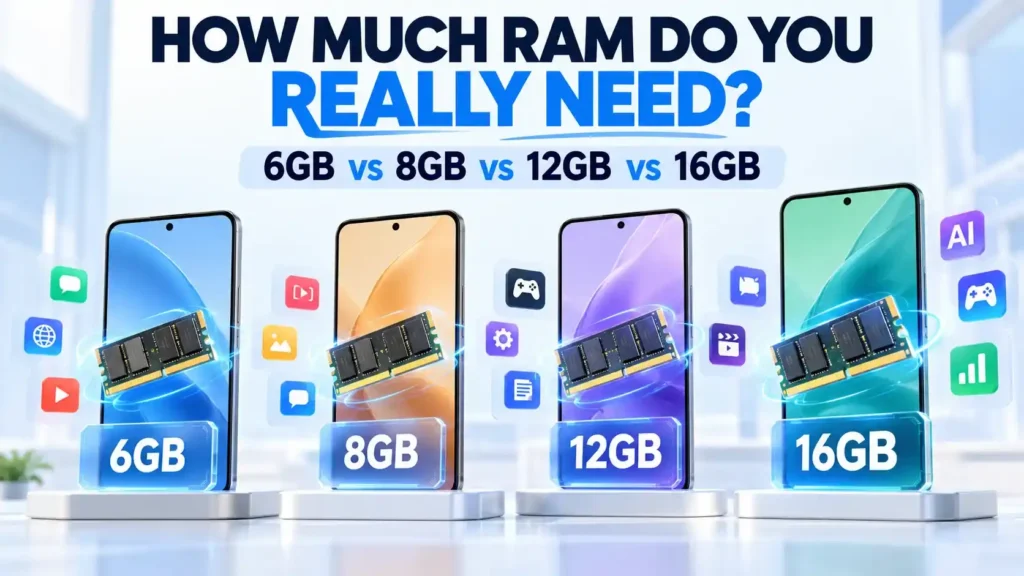
How much RAM does a smartphone actually need?
You may see smartphones advertised with 6GB vs 8GB vs 12GB vs 16GB or even higher RAM capacities. It is easy to assume that a phone with more RAM must automatically be faster. But that is not how smartphone performance works.
RAM matters, but it is only one part of the performance equation. The processor, software optimization, storage, cooling system, operating system and the way you use your phone can all make a difference.
For example, an 8GB phone with a powerful processor and well-optimized software can provide a better experience than a poorly optimized 12GB phone.
So, should you buy 6GB, 8GB, 12GB or 16GB?
This guide explains what smartphone RAM actually does, how different capacities affect everyday use, gaming and multitasking, and how to choose the right amount without simply paying for the biggest number.
Editorial Note: This guide explains smartphone RAM using information from Android documentation, semiconductor manufacturers, smartphone specifications and reputable technology sources. RAM requirements vary depending on the operating system, processor, software optimization and individual usage. The recommendations in this article are practical guidelines rather than fixed technical requirements.
What Is RAM in a Smartphone?
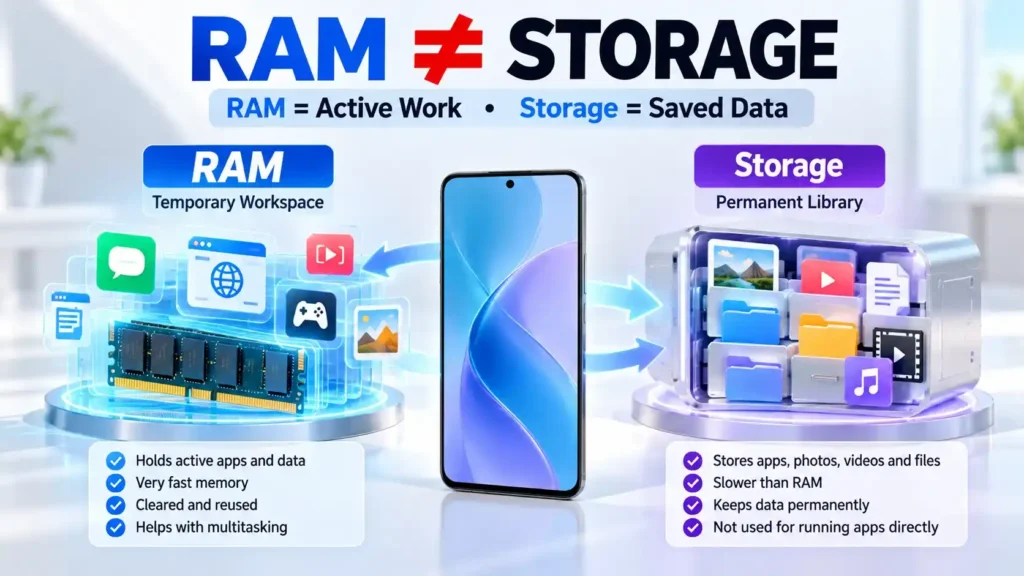
RAM stands for Random Access Memory. It is the phone’s temporary workspace. Think of RAM like a desk. When you are working, the files and tools you need immediately are placed on the desk so you can access them quickly. When you finish, some things are removed and the space is reused.
A smartphone works in a similar way. RAM temporarily holds data and processes that apps and the operating system are actively using. RAM is different from internal storage.
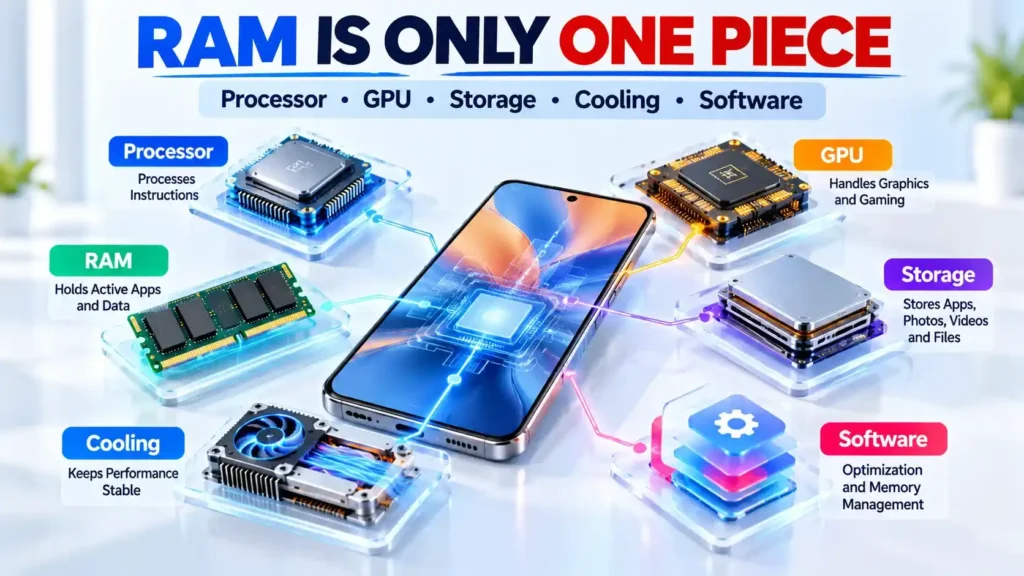
| Component | Main Purpose |
|---|---|
| RAM | Holds active apps and data |
| Internal Storage | Stores apps, photos, videos and files |
| Processor | Processes instructions |
| GPU | Handles graphics |
| NPU/AI Processor | Handles many AI-related workloads |
Android documentation describes RAM as the fastest type of memory in the phone, while storage holds persistent data such as apps, files and the operating system.
This is why 8GB RAM + 256GB storage does not mean a phone has 264GB of RAM. The two numbers describe completely different things.
📌 Read more:
- Best Smartphones for Students in 2026: Battery, Performance, Camera and Value
- Xiaomi 18 Pro vs Xiaomi 18 Pro Max: Price, Specifications, Features and Full Review
- Apple Event iPhone 18 Pro and iPhone 18 Pro Max, iPhone Duo & Apple Watch Series 12, Apple Watch Ultra 4 and AirPods 5.
- POCO F9 Ultra Price, Specifications, Features and Full Review
- Best Camera Phones 2026: Top 5 Phones for Photography and Video
- Best Phones With 8000mAh Battery in 2026
How Smartphone RAM Actually Works
When you open an app, its processes and the data it needs are placed into memory. When you switch to another app, Android can keep the previous app’s process cached so that it can potentially resume quickly. For example, imagine you open:
- Chrome
- YouTube
- Google Docs
- A game
The operating system decides how memory should be distributed between these apps and important system processes.
Android does not try to keep RAM empty. In fact, Android’s documentation explains that the platform attempts to use available memory for useful purposes, including keeping apps cached for faster switching.
When memory pressure becomes high, Android can reclaim memory, compress some pages into zRAM and, when necessary, terminate less-important processes.
Read: Xiaomi Redmi Note 17 Pro (Global): Price, Specs & Full Review
Does 5GB RAM Used of 8GB Mean You Are Running Out?
No. Seeing several gigabytes of RAM in use is not automatically a problem.
The operating system may deliberately use available memory for cached apps, system functions and other resources. What matters more is whether the phone is experiencing memory pressure, unnecessary app reloads, slow task switching or other performance problems.
Android even supports mechanisms for freezing and reclaiming memory from cached apps rather than simply treating every occupied byte as a problem.
Read: Best Phones for BGMI & Free Fire in 2026
4GB vs 6GB vs 8GB vs 12GB vs 16GB
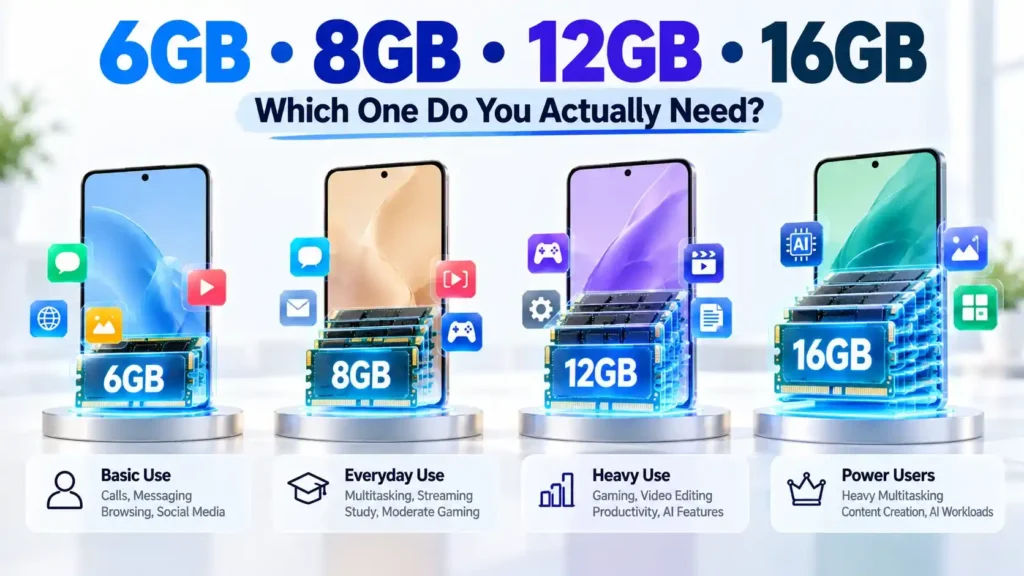
RAM requirements are not absolute. A phone’s processor, software and workload matter too.
| RAM | Suitable For | Typical Experience |
|---|---|---|
| 4GB | Basic/light use | Limited multitasking |
| 6GB | Everyday use | Good for basic users |
| 8GB | Most users | Strong balance |
| 12GB | Heavy multitasking/gaming | More memory headroom |
| 16GB | Power users | Useful for demanding workloads |
These should be treated as practical guidelines, not technical requirements.
Google’s Android documentation itself shows that memory behavior varies across devices and workloads. Its current Android vitals guidance, for example, uses different memory thresholds for devices with 4GB, 6GB, 8GB, 12GB and 16GB physical RAM.
Is 4GB RAM Still Enough?
A 4GB phone can still work for relatively light tasks. It may be suitable for:
- Calls
- Messaging
- Light web browsing
- Basic social media
- Music
- Lightweight applications
The limitations become more noticeable when you regularly switch between demanding apps, play large games or perform memory-heavy tasks.
A 4GB phone is therefore not automatically unusable or slow. Its experience depends on its processor, software and workload. However, users who want more multitasking headroom should consider higher capacities.
6GB RAM: Who Should Buy It?
6GB can be enough for many everyday users. It is a reasonable capacity for people who mainly use their phone for:
- Social media
- YouTube and streaming
- Web browsing
- Online classes
- Messaging
- Light gaming
- Basic productivity
The main limitation is multitasking. If you frequently jump between several demanding applications, a phone with more RAM may be able to retain more of those apps without reloading them.
For a basic user, however, buying additional RAM simply because a larger number looks better may not provide a noticeable benefit.
📌 Read more:
- Apple Event iPhone 18 Pro and iPhone 18 Pro Max, iPhone Duo & Apple Watch Series 12, Apple Watch Ultra 4 and AirPods 5.
- Apple iPhone 17 Series Features & Price in India 2025-26
- Best Camera Phones 2026: Top 5 Phones for Photography and Video
- Best Camera Phones Under ₹30K in 2026: Real Camera Comparison
- Best Phone Under ₹15000 in India (2026) – Top 10 Budget Picks
- Best Phones for BGMI & Free Fire in 2026: Smooth FPS, Zero Lag & Best Gaming Experience
8GB RAM: Is It the Sweet Spot?
For many smartphone buyers, 8GB is a practical balance. It provides more headroom for multitasking while avoiding the assumption that every user needs 12GB or 16GB. An 8GB phone can be well suited to:
- Social media
- Streaming
- Web browsing
- Productivity
- Photography
- Study
- Moderate gaming
- Frequent app switching
- Everyday AI features
That does not mean 8GB is enough for every person. A serious mobile gamer, video editor or power user may benefit from more. But for many everyday users, 8GB offers a sensible combination of performance, flexibility and price.
12GB RAM: Who Actually Needs It?
12GB becomes more interesting when your workload is heavier. It can provide additional memory headroom for:
- Heavy multitasking
- High-end gaming
- Video editing
- Large productivity workloads
- Frequent switching between demanding apps
- Some advanced AI workloads
- Power-user workflows
However, 12GB does not automatically make every app open twice as fast as an 8GB phone. If an application does not need the additional memory, having more RAM does not magically create additional performance. The benefit is primarily additional headroom when the workload actually requires it.
16GB RAM: Do You Really Need It?
For basic smartphone use, 16GB is generally unnecessary. Calls, messaging, social media, streaming, browsing and normal productivity do not automatically require 16GB. It can make more sense for users who regularly perform demanding workloads such as:
- Serious mobile gaming
- Heavy multitasking
- Content creation
- Advanced video editing
- Certain AI workloads
- Keeping multiple demanding applications active
The key question is not Is 16GB better? The better question is: Will my workload actually use the additional memory? If the answer is no, paying substantially more for 16GB may provide little practical benefit.
6GB or 8GB RAM which is better
| Category | 6GB | 8GB |
|---|---|---|
| Browsing | Good | More headroom |
| Social media | Good | Good |
| Streaming | Good | Good |
| Multitasking | Moderate | Better |
| Gaming | Moderate | Better headroom |
| Long-term flexibility | Moderate | Higher |
| Cost | Usually lower | Usually higher |
Choose 6GB when your smartphone use is relatively simple and price matters. Choose 8GB when you multitask regularly or want more flexibility for future applications.
8GB or 12GB RAM which is better
This is one of the most useful comparisons for smartphone buyers.
8GB is generally suitable for:
- Everyday users
- Students
- Social media
- Streaming
- Productivity
- Moderate gaming
- Normal photography
12GB can make more sense for:
- Heavy multitasking
- High-end gaming
- Video editing
- Advanced productivity
- Some AI workloads
- Power users
The important point is that 12GB is not automatically faster than 8GB in every task. If both phones have similar software and the workload comfortably fits within 8GB, the additional 4GB may not create a dramatic difference.
📌 Read more:
- Xiaomi Redmi Note 17 Pro (Global): Price, Specs & Full Review
- Xiaomi 18 Pro vs Xiaomi 18 Pro Max: Price, Specifications, Features and Full Review
- Xiaomi 17T Review: 5x Leica Zoom Cameras, 6500mAh Battery
- Xiaomi 17 vs iPhone 17 – कौन Best है? Full Comparison 2026
- Xiaomi 17 Series, Launch Date 2026, Price, Specs & Features
- Vivo V60e 5G: 200MP Camera, Top 6500mAh Battery at ₹29,999
12GB vs 16GB RAM
The difference between 12GB and 16GB is often more about headroom than everyday speed.
For a user who already has enough memory for their workload, moving from 12GB to 16GB may produce a smaller practical benefit than moving from a lower capacity to 12GB.
This is why the statement that 8GB -> 12GB is always more meaningful than 12GB -> 16GB should be treated as a general buying observation, not a universal benchmark. The actual benefit depends on:
- Apps being used
- Game requirements
- AI workloads
- Background processes
- Operating system
- Manufacturer optimization
RAM and Gaming
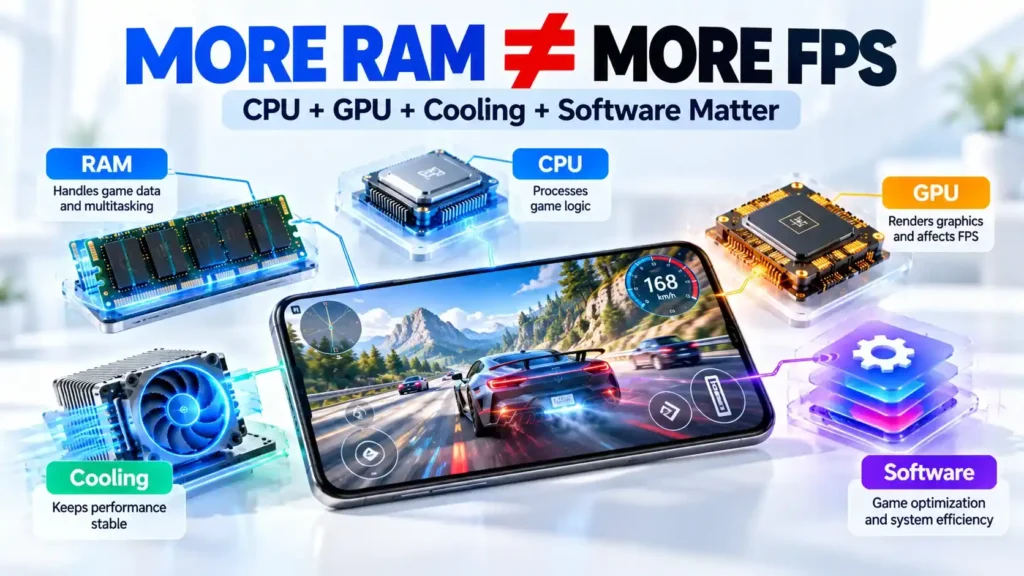
RAM matters in gaming, but it is only one part of gaming performance. Android’s game-development documentation notes that CPU, GPU, memory and other hardware components all influence how a game performs. RAM can help with:
- Keeping background apps available
- Handling game data
- Switching between a game and other apps
- Reducing the chance that a background game process is terminated
But: More RAM does not automatically mean more FPS.
Frame rates are heavily influenced by the CPU, GPU, thermal performance, game optimization and graphics settings.
A phone with 16GB RAM and a weaker GPU can therefore perform worse in a demanding game than an 8GB flagship with a substantially stronger chipset and cooling system.
Android also notes that when memory becomes limited, games and other processes can be terminated to reclaim RAM.
RAM and Multitasking
This is where additional RAM can be especially useful. Imagine switching between:
Chrome -> YouTube -> WhatsApp -> Instagram -> Spotify -> Google Docs -> Game
A phone with more available memory may be able to keep more app processes ready in memory, reducing the need to reload them.
However, Android controls memory allocation itself. Cached apps can be reclaimed when the system needs memory, so RAM capacity does not guarantee that every previously opened app will remain exactly where you left it.
The practical benefit of more RAM is therefore often better app retention and additional headroom, rather than simply making every individual app faster.
RAM and AI Features
Modern smartphones increasingly perform AI tasks directly on the device. These workloads can involve combinations of:
- CPU
- GPU
- NPU or other AI accelerators
- RAM
- Storage
Examples include:
- Generative AI
- Live translation
- AI image editing
- Voice processing
- AI assistants
- Local AI models
Modern mobile platforms increasingly use dedicated AI hardware alongside CPU and GPU resources. But there is no universal rule saying 16GB is required for AI.
AI requirements depend on the software, model size, processor, memory architecture and manufacturer’s implementation. A phone with 8GB can support AI features designed for that device, while a more demanding local AI workload may benefit from additional memory.
Does More RAM Improve Battery Life?
Not necessarily. Battery life depends on many factors, including:
- Processor efficiency
- Display
- Network connection
- Battery capacity
- Screen brightness
- Background activity
- Software
- Gaming
- Thermal management
- RAM management
More RAM can sometimes help a workload by allowing apps or data to remain available rather than being repeatedly reloaded. But RAM capacity by itself should not be treated as a battery-life feature.
Virtual RAM Explained
Many phone manufacturers advertise features such as RAM expansion, RAM Plus or virtual RAM. The basic idea is that the operating system can use compressed memory or other mechanisms to provide additional memory capacity or swap space.
Android itself uses zRAM, a compressed region of RAM used for swap. Android documentation explains that memory pages can be compressed into zRAM when the system needs to reclaim physical RAM.
But remember: 8GB physical RAM + 8GB virtual RAM does not mean the phone has 16GB of physical RAM.
Virtual memory is not a direct replacement for physical RAM. It has different performance characteristics and depends on how the phone’s software implements the feature.
So don’t choose a smartphone solely because its marketing says: 8GB RAM + 8GB RAM Expansion = 16GB.
Look at the physical RAM capacity first.
RAM vs Storage: Don’t Confuse Them
| Feature | RAM | Storage |
|---|---|---|
| Purpose | Active data | Permanent files |
| Main role | Running workloads | Saving data |
| Photos | No | Yes |
| Videos | No | Yes |
| Apps while running | Yes | App files are stored here |
| Multitasking | Directly relevant | Indirectly relevant |
| Typical capacity | Smaller | Much larger |
Storage holds your photos, videos, applications and other persistent files. RAM provides temporary working space for the operating system and running workloads.
Android documentation also distinguishes physical RAM, zRAM and storage as separate parts of the memory system.
Does RAM Affect Smartphone Speed?
Yes, but not by itself. Overall smartphone performance depends on a combination of:
- RAM
- CPU
- GPU
- Storage performance
- Software optimization
- Thermal management
- App optimization
- Operating system
Consider two phones:
- Phone A: 8GB RAM + powerful flagship processor + efficient cooling
- Phone B: 12GB RAM + weaker processor + less effective cooling
- Phone B has the larger RAM number, but that does not mean it will be faster in every task.
- This is why RAM should always be evaluated as part of the entire hardware and software package.
How Much RAM Does an Android Phone Need?
Here is a practical buying guide:
Basic users – 6GB
Suitable for:
- Calls
- Messaging
- Browsing
- Social media
- Streaming
Most everyday users – 8GB
Suitable for:
- Multitasking
- Study
- Productivity
- Social media
- Streaming
- Moderate gaming
Heavy users – 12GB
Useful for:
- Heavy multitasking
- Gaming
- Editing
- Demanding applications
- Some advanced AI workloads
Power users – 16GB
Makes sense when:
- You regularly use demanding applications
- You are a serious mobile gamer
- You create content on your phone
- You use memory-intensive workflows
- You specifically want additional memory headroom
These are guidelines, not hard technical requirements.
How Much RAM Should You Buy for Long-Term Use?

If you plan to keep a phone for several years, it makes sense to consider how your usage could change.
Apps can become more sophisticated, operating systems can gain new features and AI capabilities can increase the memory demands of certain workloads.
For a 2–3 year period, buying enough RAM for your current workload is usually more important than chasing the largest capacity.
For 4–5 years, having additional headroom may be useful, particularly if you are a heavy multitasker.
However, RAM capacity cannot guarantee a specific lifespan. Processor performance, software support, battery health, storage, thermal design and software updates also matter.
Does iPhone Need as Much RAM as Android?
RAM numbers cannot be directly compared between iPhone and Android phones.
Apple’s operating systems and hardware are designed differently from Android devices, and each platform has its own memory-management behavior.
For example, Apple documents how iOS responds to memory pressure and can terminate applications when available memory becomes insufficient.
Therefore, comparing an iPhone and Android phone simply by saying “this one has more RAM, so it must be faster” can be misleading.
The complete hardware and software design matters more than the RAM number alone.
Common RAM Buying Mistakes
Mistake 1: Buying based only on RAM
A bigger RAM number does not automatically mean a faster phone.
Mistake 2: Treating virtual RAM as physical RAM
Virtual RAM is not equivalent to having the same amount of physical RAM.
Mistake 3: Assuming more RAM means more FPS
Gaming performance also depends heavily on the CPU, GPU, cooling and game optimization.
Mistake 4: Ignoring the processor
A powerful processor can have a much bigger effect on many workloads than adding several gigabytes of RAM.
Mistake 5: Ignoring software optimization
Two phones with the same RAM capacity can behave differently because of their software and memory management.
Mistake 6: Paying a large premium for RAM you don’t need
If your workload comfortably fits within 8GB, paying significantly more for 16GB may not provide a noticeable everyday improvement.
Mistake 7: Ignoring storage capacity
A phone can have plenty of RAM but still become inconvenient if it does not have enough storage for your photos, videos, apps and files.
How to Choose the Right RAM When Buying a Phone
Choose 6GB if:
- You mainly make calls
- You use messaging apps
- You browse the web
- You use social media
- You stream video
- You do light everyday tasks
Choose 8GB if:
- You want a balanced everyday phone
- You multitask regularly
- You study or work on your phone
- You play games occasionally or moderately
- You want additional flexibility
Choose 12GB if:
- You multitask heavily
- You play demanding games
- You edit photos or videos
- You use demanding applications
- You have specific AI or power-user workloads
Choose 16GB if:
- You are a serious power user
- You regularly use demanding applications
- You perform heavy mobile gaming or content-creation workloads
- You specifically need additional memory headroom
Final Verdict: How Much RAM Do You Really Need?
There is no single RAM capacity that is right for every smartphone user. A practical way to think about it is:
- 6GB: Good for basic users
- 8GB: A strong choice for many users
- 12GB: Useful for heavy users and gamers
- 16GB: Mainly for power users and demanding workloads
The most important lesson is that RAM capacity should not be viewed in isolation.
When buying a smartphone, consider the processor, GPU, software optimization, storage technology, cooling system, operating system and your actual workload alongside RAM.
If you mainly use WhatsApp, YouTube, social media and web browsing, you probably do not need the biggest RAM number available.
If you regularly game, edit videos, switch between demanding apps or use advanced AI features, additional RAM can provide useful headroom.
In other words, don’t buy the phone with the biggest RAM number simply because the number looks impressive.
Buy a balanced smartphone that matches the way you actually use it.
📌 Read more:
- Samsung Galaxy S25 FE – Big Battery & Fast Charging
- Motorola Edge 60 Neo 5G: Compact Design, 50MP Camera, 12GB RAM
- Samsung Galaxy S26 Edge: Expected Price & Launch Date
- Google Pixel 10 featuring a powerful 48 MP camera
- OnePlus 12 5G: Premium Phone with Great Speed at ₹69,999
- Tecno Pova Slim 5G – Amazing Slim Phone with Power and Performance
How Much RAM Do You Really Need FAQs
Q1. Is 6GB RAM enough for a smartphone?
A1. Yes. 6GB can be suitable for calls, messaging, browsing, social media, streaming and other everyday tasks. Heavy multitasking and demanding games may benefit from more RAM.
Q2. Is 8GB RAM enough in 2026?
A2. For many users, yes. 8GB provides a practical balance for everyday apps, multitasking, streaming, productivity and moderate gaming. The processor and software still matter greatly.
Q3. Is 12GB RAM better than 8GB?
A3. It provides more memory headroom, but it does not automatically make every task faster. The benefit is more noticeable with heavy multitasking and demanding workloads.
Q4. Do I need 16GB RAM for gaming?
A4. Not necessarily. Gaming performance depends heavily on the CPU, GPU, cooling and game optimization. 16GB can provide additional headroom, but it is not a universal gaming requirement.
Q5. Does more RAM make a phone faster?
A5. More RAM can improve multitasking and app retention when memory is a limitation. It does not automatically make the processor faster or increase performance in every application.
Q6. Does more RAM improve battery life?
A6. Not by itself. Battery life depends on the processor, display, battery, software, network activity, background processes and many other factors.
Q7. What is virtual RAM?
A7. Virtual RAM refers to software-based memory mechanisms that use techniques such as compressed memory or swap to help manage memory pressure.
Q8. Is virtual RAM the same as physical RAM?
A8. No. Virtual RAM should not be treated as an equal replacement for physical RAM. Its performance and behavior depend on the implementation.
Q9. How much RAM does Android need?
A9. There is no single universal requirement. Android devices use different amounts of RAM depending on hardware, software and workload. For buyers, 6GB, 8GB and 12GB represent different levels of practical headroom rather than fixed requirements.
Q10. Is 8GB RAM enough for students?
A10. For most students, 8GB is a strong practical choice. It can comfortably support browsing, online classes, documents, messaging, streaming and normal multitasking on a well-optimized phone.
Q11. Is 12GB RAM enough for gaming?
A11. 12GB can provide plenty of memory headroom for many gaming workloads. However, the GPU, processor, cooling and game optimization remain critical to actual gaming performance.
Q12. Does iPhone RAM work differently from Android RAM?
A12. Yes. iOS and Android use different operating-system architectures and memory-management approaches. RAM capacity therefore should not be compared directly between platforms without considering the complete hardware and software design.
The simple rule: choose enough RAM for your workload, then evaluate the processor, software, storage and cooling as a complete package.
Disclaimer: Product prices, features, and specifications mentioned on this website may change without notice. Please check the official brand website or trusted retailers for the latest updates before making any purchase.
Related Posts
- Best Smartphones for Students in 2026: Battery, Performance, Camera and Value

- Xiaomi 18 Pro vs Xiaomi 18 Pro Max: Price, Specifications, Features and Full Review
- Apple Event iPhone 18 Pro and iPhone 18 Pro Max, iPhone Duo & Apple Watch Series 12, Apple Watch Ultra 4 and AirPods 5.

- POCO F9 Ultra Price, Specifications, Features and Full Review

- Best Camera Phones 2026: Top 5 Phones for Photography and Video

- Best Phones With 8000mAh Battery in 2026

- Google Pixel 11 vs Pixel 11 Pro vs Pixel 11 Pro Fold: Which Pixel Should You Buy?

- iPhone 18 Pro Everything We Know So Far About Apple iPhone 18 Pro 2026

Latest Phone
- Lava Virat Curve 5G
 ₹20,999
 - OnePlus N6 Lite 4G
 ₹16,999
 - AI+ Nova 2 Power 5G
 ₹16,999
 - Google Pixel 11
 ₹89,999

Aman is a content writer specializing in technology and automobile topics, including smartphones, gadgets, car reviews, and electric vehicles. He creates clear and informative articles that help readers understand the latest updates, features, and trends in a simple and reliable way.